
PhilHealth MDR: How to Get It Online (2026 Guide)
The first time a hospital asked me for “your MDR,” I confidently handed over my PhilHealth ID card. The admitting staff just looked at me and said, gently, that’s not the same thing. That mix-up cost me twenty awkward minutes I didn’t have that day — so let’s make sure it doesn’t cost you any.
On this page
- Quick Answer
- What Is the PhilHealth MDR?
- MDR vs. PIN vs. PhilHealth ID
- How to Get Your PhilHealth MDR Online
- Getting Your MDR In Person
- MDR Requests for OFWs
- How to Update Your MDR
- What’s Actually Inside the MDR Form
- A Clarification Worth Knowing
- Common MDR Problems and Fixes
- Frequently Asked Questions
Quick Answer
PhilHealth MDR stands for Member Data Record — the official document proving you’re an active member and listing your covered dependents. It’s not your ID card. The fastest way to get your PhilHealth MDR online is to log in to the Member Portal and click Print MDR — it takes about two minutes and produces a PDF hospitals accept the same as a physical printout.
What Is the PhilHealth MDR?
Your Member Data Record lists your PIN, personal details, membership category, employer information (if applicable), and — most importantly for hospital admissions — every dependent you’ve formally declared. Hospitals check this specific document to confirm you’re covered and to see exactly who else in your family is covered under you.
This matters for PhilHealth benefits generally, but it especially matters for maternity coverage and, for serious diagnoses, Z Benefits — if a dependent isn’t listed on your MDR, they aren’t covered, no matter how active your own membership is.
MDR vs. PIN vs. PhilHealth ID
If you’re trying to figure out how to get PhilHealth MDR versus your ID card versus your PIN, these three get mixed up constantly, so here’s the actual side-by-side:
| Feature | MDR | PIN | PhilHealth ID |
|---|---|---|---|
| What it is | A detailed record document | A 12-digit number | An identification card |
| Shows dependents | Yes, full list | No | No |
| Shows employer info | Yes | No | No |
| Reprint needed after an update | Yes | No — stays the same for life | Only if details change |
| What hospitals actually check | This one, primarily | Referenced as your identifier | Sometimes accepted, secondary |
If you’ve lost track of your PIN entirely, that’s a separate recovery process from anything covered here — sort that out first before trying to pull an MDR. And if it’s the physical card itself you’re after rather than this document, our PhilHealth ID guide covers that separately.
How to Get Your PhilHealth MDR Online
You don’t need a branch visit for this anymore. Here’s the exact flow, with real screenshots for each step. If you’ve never created a Member Portal account before, you’ll need to do that first — our online registration guide covers account creation if step 3 below doesn’t apply to you yet.
Go to Online Services
Visit philhealth.gov.ph directly and click Online Services from the main menu.

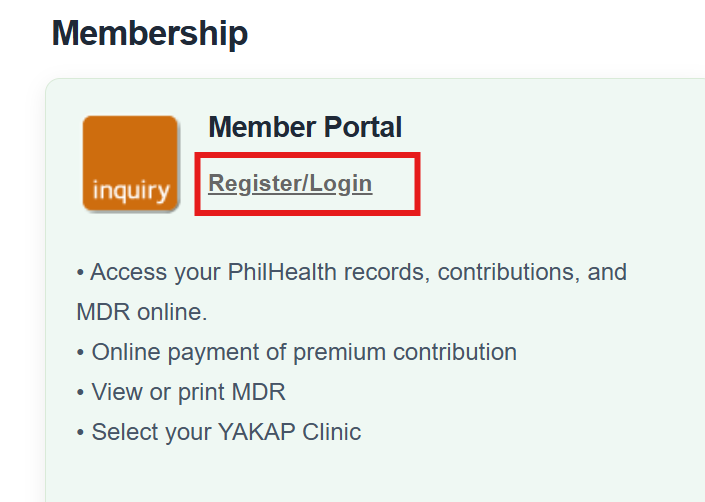
Click Register/Login under Member Portal
This opens the sign-in page for individual members — not EPRS or IHCP.
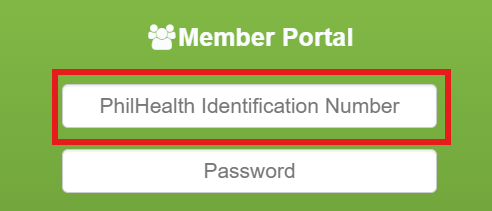
Enter your 12-digit PIN
Your PIN doubles as your username. It’s printed on any old MDR copy or your PhilHealth ID.
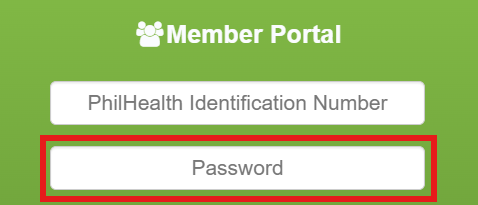
Enter your password
Case-sensitive — check Caps Lock before assuming something’s actually wrong.
Complete the CAPTCHA
Type what’s shown, or refresh for a clearer one if it’s hard to read.

Log in, then click Print MDR
Your member information loads automatically on the dashboard — look for the Print MDR button near the top and click it to generate your PDF.

Before you rely on the printout, actually read it — check that your name, employer, and dependents are all correct. Catching an error on the PDF is a lot less stressful than catching it at an admitting desk.
Getting Your MDR In Person
Prefer a physical copy, or don’t have reliable internet access? A branch visit still works:
- Get a request form at any PhilHealth branch and fill in your name, PIN, birthdate, and address.
- Check the “Member Data Record (MDR)” box to specify what you’re requesting.
- Submit the form with a valid government ID.
- Most branches print and hand it over within minutes.
If you’d rather not wait in line, booking a PhilHealth online appointment beforehand can save real time.
MDR Requests for OFWs
If you’re working abroad, you don’t need to wait until you’re home. OFWs with an existing Member Portal account can log in and print their MDR from anywhere with an internet connection, the same as any other member. Without an account yet, emailing PhilHealth’s Action Center with your full name and birthdate is the usual fallback — just confirm the current official contact channel on philhealth.gov.ph, since these details shift occasionally.
How to Update Your MDR
Your MDR only stays useful if it’s accurate, so update it whenever something genuinely changes — a new address, a marriage, a new baby, a new employer. The mechanism for all of these is the same form:
- Download a fresh PMRF — always the current version, not an old saved copy.
- Fill in only the fields that changed, marking the form as an update rather than a new registration.
- Attach the supporting document for that specific change — a marriage certificate, a newborn’s birth certificate, proof of new employment.
- Submit by email to your regional office or in person, depending on what your local branch accepts.
- Log back in and reprint your MDR to confirm the change actually took.
Not sure which membership category you should be listed under after a life change — like moving from employed to voluntary? Or need the exact document list for your specific update? Our requirements guide covers that by scenario.
What’s Actually Inside the MDR Form
- Your 12-digit PIN
- Full name and birthdate
- Address and contact details
- Membership category — employed, voluntary, OFW, senior, and so on
- Employer information, if applicable
- Every declared dependent, with their relationship to you
A Clarification Worth Knowing
Common MDR Problems and Fixes
| Problem | Fix |
|---|---|
| MDR shows outdated info | An update was likely never submitted — file a PMRF update |
| Dependent missing from MDR | They weren’t formally declared with supporting documents — submit those |
| Can’t log in to print it | Check your PIN and password; use account recovery if needed |
| Employer info is wrong | Usually an employer reporting issue — raise it with HR directly |
Frequently Asked Questions
How do I get my PhilHealth MDR online?
Log in to the Member Portal with your PIN and password, then click Print MDR on your dashboard to generate a PDF copy — no branch visit needed.
Is the PhilHealth MDR the same as my PhilHealth ID?
No. The MDR is a detailed record document listing your dependents and membership details; the ID card is just a form of identification. Hospitals primarily check the MDR.
What is the PhilHealth MDR form used for?
It’s the official record hospitals, employers, and government offices check to confirm your active PhilHealth membership and see exactly which dependents are covered under you.
Is there a fee to get my MDR?
No — printing or requesting your own MDR, whether online or in person, doesn’t cost anything.
How do I update incorrect information on my MDR?
Submit a PMRF marked as an update, along with the relevant supporting document, then log back in afterward to reprint your MDR and confirm the change went through.
Can OFWs get their MDR while working abroad?
Yes — through the Member Portal if they already have an account, or by contacting PhilHealth’s Action Center directly if they don’t.
About to head to a hospital appointment?
Log in and print a fresh MDR the night before, not the morning of — that alone avoids most of the delays people run into at admission.