
PhilHealth Login: Member, Employer & Provider Portal Guide (2026)
My first failed PhilHealth login had nothing to do with a forgotten password. I’d typed my PIN straight off my ID card, dashes and all, and the portal kept rejecting it. The number needs to go in plain, no dashes, no spaces. Small thing, ten wasted minutes. This guide walks through the member side, the employer side, and the few quiet details that cost people the most time.
On this page
- Quick answer
- Which PhilHealth login do you need?
- How to log in to the member portal
- Never logged in before? Set up an account first
- Employer login through EPRS
- Provider login through IHCP
- What the login is actually for
- Why your login keeps failing
- The 5% vs 5.5% mix-up
- Staying safe from fake login pages
- Quick answers
Quick answer
Individual members log in at the PhilHealth Member Portal (memberinquiry.philhealth.gov.ph) using their 12-digit PIN and password. Employers don’t use that page at all. They log in through a separate system called EPRS with an Employer Number (PEN). Hospitals and clinics use a third one, the IHCP Portal. Pick the wrong door for your role and the login will never work, no matter how correct your details are.
Which PhilHealth login do you need?
PhilHealth runs three separate portals, and they don’t share credentials. Before you type anything, be sure which one applies to you.
| Portal | For | What you log in with |
|---|---|---|
| Member Portal | Employed, self-employed, voluntary, and OFW members | 12-digit PIN + password |
| EPRS | Business owners, HR and payroll staff | Employer Number (PEN) + password |
| IHCP Portal | Accredited hospitals, clinics, and providers | Accreditation credentials |
If you’re just checking your own contributions or pulling your records, the member portal is the one you want. Everything below covers that first, then EPRS and IHCP after.
How to log in to the member portal
Here’s the whole thing, click by click, with a screenshot of each screen so you know you’re on the right page.
Open Online Services
Type philhealth.gov.ph into your browser yourself. Don’t tap a link from a text or a Facebook post. Then click Online Services in the top menu.

Choose Register/Login
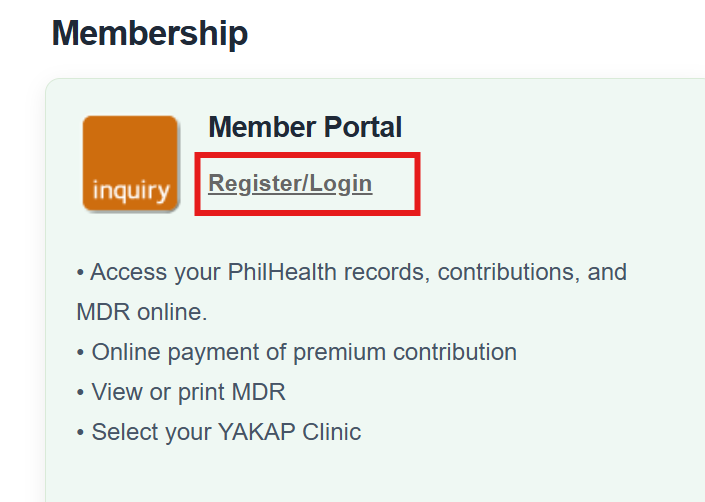
Find the Member Portal card and click Register/Login. That’s the door for individual members, separate from the employer and provider options on the same page.
Type your 12-digit PIN
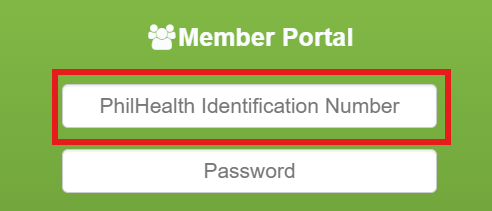
Your PIN doubles as your username. Copy it from your PhilHealth ID or MDR, but leave out the dashes and spaces. Twelve digits, nothing else.
Enter your password
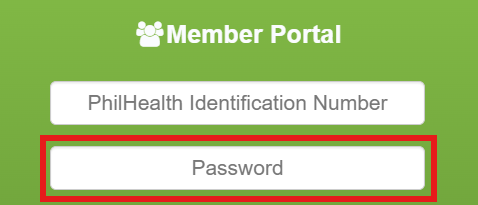
It’s case-sensitive, so a stray Caps Lock is a common culprit. If you set the account up years ago and can’t recall the password, don’t keep guessing. You get a limited number of tries before a lockout.
Solve the CAPTCHA
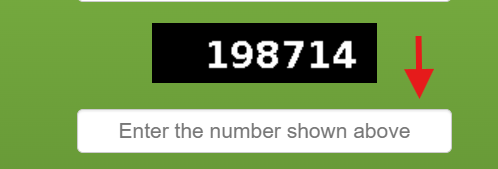
Retype the characters in the image. If they’re a blur, hit the refresh icon for a clearer set instead of submitting a guess and burning an attempt.
Click Log In
The dashboard loads. From here you can view contributions, print your MDR, and generate a payment reference, all covered below.
Never logged in before? Set up an account first
Being a registered PhilHealth member and having a portal account are two different things. Plenty of people have a PIN but have never once logged in online. If that’s you, do this one-time setup before the six steps above will do anything:
- On the Member Portal, click Create Account instead of logging in.
- Enter your PIN, full name, and birthdate exactly as PhilHealth has them on record. A mismatched middle name is enough to stop it.
- Give an email you check often. It handles your activation link now and any password resets later.
- Set a password, then open your inbox and click the activation link to switch the account on.
If the activation email never lands, check spam before anything else. Still nothing usually means the email on your record is old, and that’s fixed in person, not online. Search “PhilHealth near me” for your closest LHIO, and if you can, book a PhilHealth online appointment so you’re not stuck in a walk-in queue for hours.
Employer login through EPRS
This trips up a lot of new HR staff, so let’s be blunt about it. The employer login is not on the Member Portal. Businesses use EPRS, the Electronic Premium Reporting System, a standalone platform for reporting and remitting employee contributions.
How EPRS login works
- Open EPRS from the Online Services page on the official site.
- Put your PEN in the username field.
- Enter the EPRS password issued to you after PhilHealth verifies your access request.
- You’re in, and you can now post remittances, manage staff records, and pull statements.
Brand new to EPRS? You’ll file an access request first, and verification isn’t instant. Budget a week or two before your credentials come through. Once inside, you can flag employees as active or inactive, submit contribution reports, and generate a Statement of Account for compliance.
Provider login through IHCP
The clinical side gets its own portal too. Accredited hospitals and clinics log in to the IHCP (Institutional Health Care Provider) Portal to confirm a patient’s eligibility on the spot and file claims. These logins are handed out during facility accreditation through the PhilHealth Regional Office. A member or an employer can’t request them, so if you’re neither a provider nor their billing staff, this portal isn’t yours to use.
What the login is actually for
Once you’re on the member dashboard, the useful stuff lives here:
- See your full contribution history and whether payments are posting.
- Print your MDR, the Member Data Record hospitals read at admission to confirm you’re active and see your dependents.
- Generate a PRN (Payment Reference Number) to pay your next contribution through GCash, Maya, or a bank.
- Add or update dependents and correct personal details.
- Assign yourself to a Konsulta clinic to switch on outpatient benefits.
Why your login keeps failing
Most login trouble comes down to a handful of causes. Rule them out in this order.
| What you see | Usual reason | What to do |
|---|---|---|
| Invalid credentials | PIN typed with dashes, wrong password, or Caps Lock on | Re-enter the PIN plain, check the password, then use Forgot Password |
| Account locked | Too many failed tries | Wait it out (roughly half an hour) or reset the password |
| Page won’t load | Heavy traffic or maintenance | Try incognito, a different browser, or an off-peak hour |
| Reset email never comes | The email on your record is outdated | Update it in person at an LHIO; it can’t be self-served |
To reset a forgotten password, click Forgot Password, enter your PIN and registered email, and follow the link that lands in your inbox. If that inbox is one you no longer use, the portal genuinely can’t rescue you, and it becomes a branch visit.
Forgotten the PIN itself, not just the password? Different problem, different fix. Recovering your number is free, and our lost PhilHealth number guide covers it. Don’t pay a fixer for something PhilHealth does for nothing.
The 5% vs 5.5% mix-up
Why it matters here: after you log in and open your contribution history, the posted amounts follow the 5% math. If a figure you saw elsewhere used 5.5% and doesn’t match, your account isn’t broken, the other source is stale. For the full breakdown by salary bracket, see our PhilHealth contribution guide, or drop your income into the contribution calculator and check it against what’s posting.
Staying safe from fake login pages
Login is exactly where scams cluster, because a stolen PIN and password hands over your whole record. A few habits keep you clear:
- Only ever type your details on a page whose address ends in philhealth.gov.ph. Bookmark it and use the bookmark.
- Ignore login links sent by SMS or social media. PhilHealth doesn’t send them, and copycat pages have circulated before.
- Skip logging in over open public Wi-Fi unless you’re on a VPN.
- Log out when you’re done instead of just closing the tab, especially on a shared computer.
- Keep your registered email current. It’s your only real way back in if you’re locked out.
Quick answers
How do I log in to the PhilHealth member portal?
Go to philhealth.gov.ph, open Online Services, click Register/Login under Member Portal, then enter your 12-digit PIN, your password, and the CAPTCHA to reach your dashboard.
Is my PIN the same as my PhilHealth number?
Yes. The PIN (PhilHealth Identification Number) and your PhilHealth number are the same 12-digit code, and it’s also your member portal username.
Why does the portal reject my PIN even though it’s correct?
Usually because it was typed with the dashes or spaces from your ID card. Enter all 12 digits with no separators.
Do employers use the same login as members?
No. Employers log in to EPRS with an Employer Number (PEN), which is a completely separate system from the member portal and a different credential from a member’s PIN.
Is there an official PhilHealth mobile app?
There’s no standalone member app to rely on for login as of 2026. The member portal is mobile-friendly and works through a normal browser on your phone.
Can I log in from abroad as an OFW?
Yes. The member portal works the same anywhere with internet, and you can generate a PRN to pay contributions online through GCash, Maya, or a bank transfer.
What if I forgot both my password and my email?
Forgot Password handles a lost password if your registered email still works. If that email is dead too, the portal can’t reset you, and you’ll need to update your details in person at an LHIO.
Stuck at the login screen?
Clear the easy causes first: retype your PIN with no dashes, check Caps Lock, rule out an old password. If it’s the PIN you’ve actually lost rather than the password, recovering it is free, and our recovery guide walks you through it.