Philhealth Guide

PhilHealth Portal Guide 2026: Login, MDR & YAKAP
Independent member guide, not affiliated with or endorsed by PhilHealth. Updated August 2026. Go straight to the official portal →
Updated August 2026 · YAKAP rules included

PhilHealth Portal Guide 2026: Login, MDR & YAKAP

Three separate systems hide behind the phrase PhilHealth portal, and picking the wrong one is the reason most people get stuck. Members sign in to the PhilHealth Member Portal with a 12-digit PIN. Employers use EPRS with a PEN. Hospitals and clinics use IHCP with an accreditation number. The credentials don’t cross over. Reach any of them from philhealth.gov.ph under Online Services, and nowhere else. Below you’ll find the full PhilHealth login sequence with a screenshot of every screen, how to get your PIN back when it’s gone, what hospitals actually check at admission, the 2026 contribution figures with sources, and the YAKAP step most members don’t know they still owe.

5% rate checked against the PIA advisory of May 6, 2026 YAKAP steps checked against PhilHealth Circular 2025-0017
In a hurry

What is the PhilHealth portal?

  • Sign in only from philhealth.gov.phOnline Services. Not from a text message. Not from a Facebook post.
  • Your 12-digit PIN is your Member Portal username. It’s printed on your ID card, your MDR, and most old payslips.
  • A PIN by itself isn’t an account. If the portal says your account doesn’t exist, you need to register on the portal first.
  • Employers log in to EPRS with a PEN. Different number, different system, different password.
  • Providers log in to IHCP with an Accreditation Number, plus a liveness check through the PhilHealth Check Utility.
  • New members start with the PMRF, online or at an LHIO.
  • At admission, hospitals read your MDR, not your ID card. A dependent who isn’t on the MDR isn’t covered.
  • Free consultations need YAKAP empanelment on top of membership. That part is below.
Start here

Which PhilHealth portal do you actually need?

PhilHealth runs three member-facing systems, and they don’t share accounts. If your password keeps failing, check that you’re on the right one before you reset anything.

Individual member

Member Portal

For employed, self-employed, voluntary, OFW, senior, and sponsored members. Check contributions, print your MDR, update details, pick a YAKAP clinic.

Business / HR

EPRS

The Electronic Premium Reporting System. Employers post remittances and file ER2 employee reports here using their PEN.

Hospitals & clinics

IHCP Portal

Accredited facilities verify member eligibility and file claims, with a biometric or liveness check layered on top of the login.

A PEN and a PIN look alike on a form and behave nothing alike. If you’re HR and someone hands you a 12-digit number, that’s an employee’s PIN. Your own employer number belongs in EPRS.
Step by step, with screenshots

How do I log in to the PhilHealth portal?

Open philhealth.gov.ph, click Online Services, choose Member Portal, then enter your 12-digit PIN, your password, and the CAPTCHA. Six screens total. Here’s each one.

1

Open the official site and click Online Services

Type philhealth.gov.ph into the address bar yourself rather than tapping a search ad or a forwarded link. The Online Services tab sits in the top navigation. Sponsored results for this keyword are a known phishing route.

philhealth.gov.ph
PhilHealth portal Online Services menu on philhealth.gov.ph, 2026
2

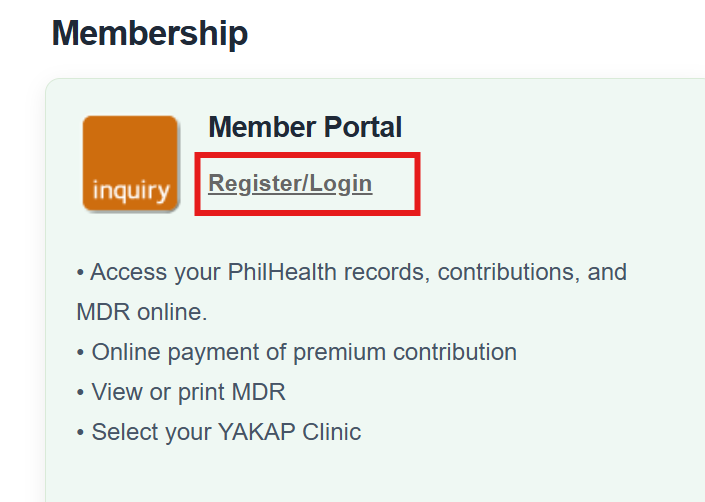
Click Register/Login under Member Portal

Online Services lists all three systems on one page. Pick the Member Portal block, not EPRS or IHCP. The login page that opens sits on a philhealth.gov.ph address. If the domain reads anything else once the page loads, close the tab.

philhealth.gov.ph/services
PhilHealth Member Portal Register or Login button under Online Services
3

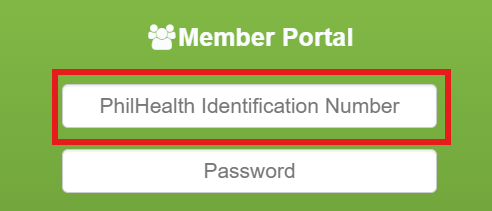
Enter your 12-digit PIN

Your PhilHealth Identification Number is the username field. It’s on your ID card, your MDR, and old payslips. Type it without dashes or spaces. Copying it out of a PDF often drags a trailing space along, which the field reads as a wrong number.

philhealth.gov.ph/login
Entering a 12-digit PIN on the PhilHealth Member Portal login page
4

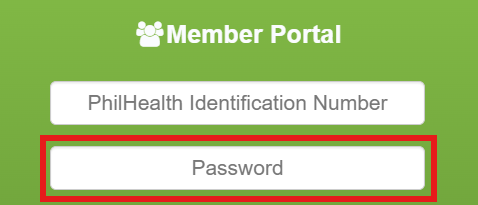
Type your portal password

This is the password you set when you created your portal account, not anything PhilHealth printed on a form. It’s case sensitive. Phone keyboards love to capitalise the first letter for you, so check that before you decide the password is wrong.

philhealth.gov.ph/login
PhilHealth Member Portal password field, 2026
5

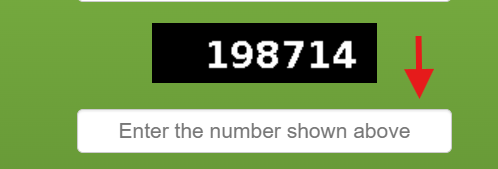
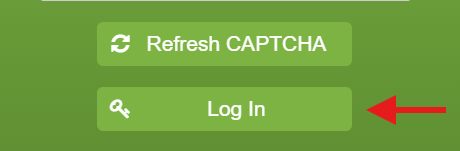
Clear the CAPTCHA

Enter the characters shown in the image. This one expires quietly. If you filled the form slowly, or you tabbed away to find your PIN, refresh the CAPTCHA before submitting or you’ll get bounced with no explanation.

philhealth.gov.ph/login
PhilHealth portal login CAPTCHA verification field
6

Log in and land on your dashboard

You should see your name, your member category, and a menu with Member Information. From here you can review posted contributions, print your MDR, correct personal details, and check your YAKAP clinic assignment.

philhealth.gov.ph/dashboard
PhilHealth Member Portal dashboard after login, 2026

Why does the PhilHealth portal say invalid credentials?

Almost always one of four things, and they’re worth ruling out in this order before you assume the system is down.

  1. A stray character in the PIN. Retype it by hand instead of pasting. Twelve digits, nothing else.
  2. Caps Lock or phone autocapitalisation. Tap the eye icon and read the password back to yourself.
  3. An expired CAPTCHA. Refresh it and resubmit without changing anything else.
  4. No portal account yet. Having a PhilHealth number doesn’t mean you have portal credentials. If you never registered online and never activated an emailed link, there’s nothing to log into yet. Register first, then come back.

Read the full PhilHealth login guide →

Forgot it?

How do I find my PhilHealth PIN again?

Fastest route first. The eGovPH app usually returns it in minutes; a branch visit always works but costs you a morning.

  1. eGovPH app. The government’s unified app. Link your PhilHealth record after an ID and selfie check, and your PIN appears on your digital ID.
  2. Old MDR copies, payslips, or your email. The number is printed on all three. PhilHealth also emails it at registration, so search your inbox for “PhilHealth” before you search your drawers.
  3. PhilHealth hotline. Numbers are on the official contact directory. Have a valid ID in front of you for the identity questions.
  4. Walk in to any LHIO. Slowest, most reliable, one valid ID. Book an appointment first if your branch offers slots.
Never pay a “fixer” or a Facebook page offering PIN recovery. Recovering a PIN is free at every one of the routes above, and handing your ID photos to a stranger is how identity theft starts.

Read the full lost PhilHealth number guide →

Why this guide exists

Two bad nights taught me most of this. The first: a hospital hallway at 3 a.m., 2% battery, trying to remember a 12-digit PIN, and nearly typing our family’s details into a page that had copied PhilHealth’s design down to the logo. It wasn’t PhilHealth. The second: standing at an admissions desk being told my nephew wasn’t covered, because nobody had ever filed the PMRF to add him as a dependent. His name simply wasn’t on the MDR. Both of those were avoidable with information nobody had put in one place. That’s the whole reason this page exists. The phishing pattern is here.

New members

How do I register for PhilHealth online?

Registration runs through the PMRF, the PhilHealth Member Registration Form. You give an email, complete the form, pick a member type, upload an ID, and your 12-digit PIN comes back by email.

1

Open the registration page from Online Services

Same starting point as login: philhealth.gov.ph, then Online Services, then the member registration option. Links shared in group chats are not a shortcut worth taking.

2

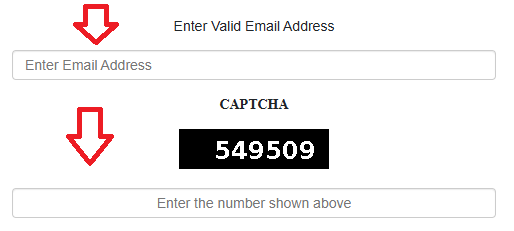
Enter your email and clear the CAPTCHA

This is where the account really begins. Your PIN and every future notice land in this inbox, so use the address you actually check, not a work address you’ll lose access to when you change jobs.

philhealth.gov.ph/register
PhilHealth online registration email address and CAPTCHA fields, 2026
3

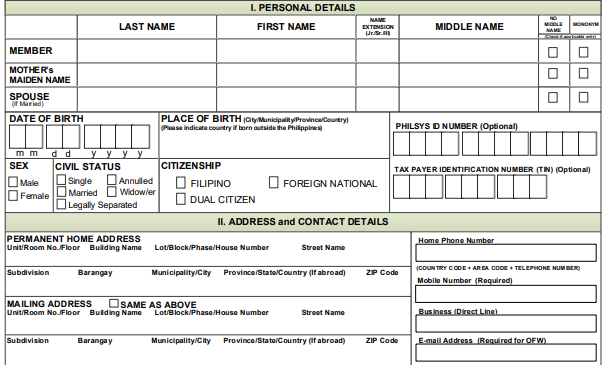
Fill out the PMRF

Complete the PhilHealth Member Registration Form with your full legal name, birthdate, and address copied exactly from your government ID. A nickname or a middle name spelled two ways is the most common reason a registration stalls.

philhealth.gov.ph/register
PhilHealth Member Registration Form PMRF online, 2026
4

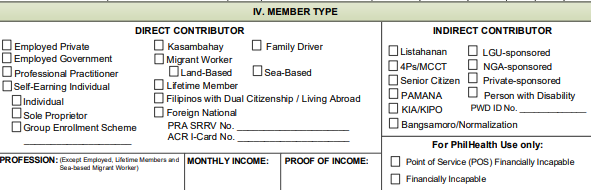
Choose your member type

Employed (private or government), Self-Employed, Voluntary, OFW, or Kasambahay. This decides how much you pay and who pays it, so read the membership category breakdown first if you’re between jobs or freelancing.

philhealth.gov.ph/register
PhilHealth member type selection screen during online registration
5

Upload one valid government ID

Passport, UMID, driver’s licence, PSA birth certificate, and voter’s ID are commonly accepted. The full requirements list covers what each member type needs, including the extra documents for OFWs and Kasambahay.

6

Get your 12-digit PIN by email

Once your details are verified, PhilHealth emails the PIN. Save it somewhere you can reach without a signal. That number is what unlocks the portal, your MDR, and every other PhilHealth online service.

Read the full PhilHealth online registration guide →

Employers & HR

Can I register my business for PhilHealth online?

Not completely. A business has to appear in person at a PhilHealth Local Health Insurance Office to finish registration, unlike individual members. Expect one branch visit and roughly one to two weeks before EPRS access goes live.

1

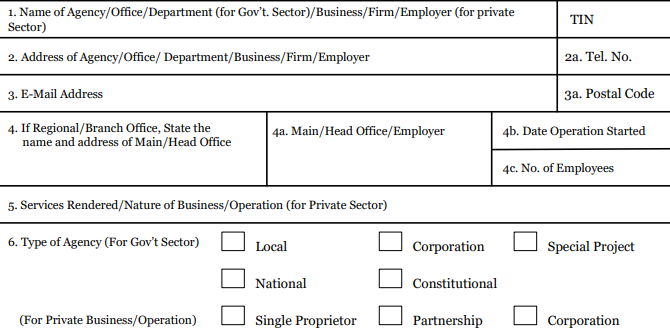
Prepare ER1, ER2, and POAF

ER1 is the Employer Data Record. ER2 is the employee list with each staff member’s PIN. POAF is the PhilHealth Online Access Form, which names the person authorised to use EPRS. Turning up with two of the three sends you home.

philhealth.gov.ph/downloads
PhilHealth employer forms ER1, ER2, and POAF for EPRS registration
  1. Gather the business documents. Every employer needs a Mayor’s or business permit and the BIR Certificate of Registration (Form 2303). Sole proprietors add DTI registration. Corporations and partnerships add SEC registration plus articles of incorporation.
  2. Submit everything at the LHIO. Once approved you get your Employer Number (PEN) and Certificate of Registration. Booking a PhilHealth online appointment first can turn a half-day queue into an hour.
  3. Activate EPRS. Email the signed POAF to your LHIO. Credentials arrive in roughly one to two weeks. Change the temporary password the first time you log in, and don’t share it across the HR team.
If an employee says their contributions are missing, check the remittance date before checking the portal. Posting lags behind payment, and a gap on the member’s screen is usually a timing issue rather than a lost payment.
What hospitals actually check

Does the hospital need my PhilHealth ID or my MDR?

Your MDR. Admissions reads the Member Data Record to confirm you’re active and to see who is listed as a dependent, and that’s the document that gets the deduction applied to the bill. The PhilHealth ID card is useful identification, but it proves nothing about your current status.

How do I get a PhilHealth ID?

Two routes, and one of them doesn’t need a branch at all.

Walk-in, same day

Physical ID card

Bring your PIN, two 1×1 photos, and a valid government ID to your LHIO. Most branches print it during the visit. An online appointment saves the queue.

No branch needed

Digital MDR

Log in, open Member Information, click Print MDR, save the PDF. Accredited facilities generally accept it the same way as the card.

The one that matters

Your dependent list

Coverage follows the MDR. If your child, spouse, or parent isn’t printed on it, the deduction won’t apply to their bill even though your own status is active.

Read the full PhilHealth ID guide →

How do I print my MDR online?

  1. Log in to the Member Portal with your PIN and password.
  2. Open Member Information and click Print MDR.
  3. Download the PDF and keep a copy on your phone, offline.
  4. Print a fresh one before an admission. A copy from eight months ago won’t show contributions posted since.

Adding or correcting a dependent means submitting an updated PMRF with supporting documents, such as a birth certificate for a newborn, at your LHIO or regional office. A human reviews it, so this isn’t a same-day change. Do it when the baby is born, not when the baby is admitted.

Read the full PhilHealth MDR guide →

Coverage basics

Who is covered, and under which category?

Membership is mandatory for Filipino citizens under the Universal Health Care Act (RA 11223). What varies is which membership category you fall into and who pays your premium.

  1. Formal economy. Private and government employees. Your employer deducts your half and remits both halves through EPRS.
  2. Informal economy. Freelancers, gig workers, and self-earning individuals who register and pay as self-employed or voluntary members.
  3. Overseas Filipino Workers. Land-based and sea-based workers stay covered while abroad.
  4. Sponsored and indigent members. Premiums subsidised through local government or national programs for qualified low-income families.
  5. Lifetime members and senior citizens. Members who reach at least 120 monthly contributions, per PhilHealth’s lifetime member page, and all citizens aged 60 and above under RA 10645, stay covered without paying premiums.

Some of these groups have their own enrolment path rather than the general online registration above. Check the official page for yours before assuming the standard steps apply:

Planning a pregnancy? PhilHealth’s qualifying rule for direct contributors has long been three monthly contributions inside the six months before delivery. Confirm your own posted contributions early, not in the third trimester. Our maternity benefits guide walks through what’s covered.
Checked against the PIA advisory, May 2026

How much is the PhilHealth contribution in 2026?

Five percent of monthly basic income, with a ₱10,000 income floor and a ₱100,000 ceiling. That works out to ₱500 minimum and ₱5,000 maximum per month. PhilHealth confirmed in a May 6, 2026 advisory that this is the final scheduled rate under RA 11223, with no increase for 2026.

Monthly salary / declared incomeTotal monthly premiumEmployed (50/50 split)Self-employed, voluntary, OFW
₱10,000 or below₱500 (fixed)₱250 each₱500 in full
₱10,000.01 to ₱99,999.995% of income2.5% each5% in full
₱100,000 and above₱5,000 (capped)₱2,500 each₱5,000 in full

Source: Philippine Information Agency, reporting PhilHealth’s advisory of May 6, 2026, and the premium schedule under Republic Act No. 11223. Read the PIA report →

Missing months as an employee? Ask HR for the remittance date first. Posting can take days or weeks to appear on your side. As a voluntary member, retroactive payment for skipped months generally isn’t allowed, so paying ahead when your income is irregular is the safer habit.
Want the exact peso figure for your salary instead of doing the arithmetic? Use the PhilHealth contribution calculator.

Read the full PhilHealth contribution guide →

Checked against PhilHealth Circular 2025-0017

Do I need to register for YAKAP separately?

Yes. Paying contributions makes you a member, and that alone gives you no free outpatient care. You also have to be empanelled at one accredited YAKAP clinic, which is then paid a fixed annual amount to look after you. YAKAP, the Yaman ng Kalusugan Program, replaced and expanded the Konsulta package in July 2025.

K
Konsulta

Primary care consultations at the clinic you’re empanelled with.

G
Gamot

75 essential medicines, up to ₱20,000 a year per member, at accredited pharmacies.

L
Laboratoryo

13 covered outpatient laboratory tests.

S
Screen

6 cancer screening tests, requested through your YAKAP clinic.

How do I enroll in YAKAP?

Four steps: choose an accredited clinic, assign yourself to it, complete a First Patient Encounter, and return at least once a year.

  1. Pick an accredited YAKAP clinic near you. Use PhilHealth’s provider list or the eGovPH app rather than a map app, since accreditation and open slots change. Clinics have a catchment limit, so the nearest one may be full.
  2. Assign yourself. Do it in the Member Portal, through eGovPH, or in person at the clinic. Check that your MDR details are correct first, because mismatches stall the assignment.
  3. Complete your First Patient Encounter. The FPE is an intake and health-risk assessment, not a normal consultation. You sign a YAKAP Empanelment Slip at this visit, and the clinic runs a PhilHealth Check Utility liveness check (Advisory 2025-0072).
  4. Come back at least once a year. Empanelment is tied to the calendar year, and members who never return can drop off the active list.

When is PhilHealth eKonsulta being shut down?

The date has moved, and sources still disagree. PhilHealth announced the decommissioning of eKonsulta in Advisory 2025-0077, with an initial migration date of July 1, 2026. Clinic software vendors now cite a later advisory (numbered 2026-0038, dated June 30, 2026) extending full migration to certified EMR systems to December 31, 2026. We couldn’t confirm the final date from a primary PhilHealth document at the time of writing. If this affects your clinic, check the issuances page directly rather than trusting any guide, this one included. Check current YAKAP issuances →

Sources: PhilHealth Circular 2025-0017 (issued October 2025, effective January 1, 2026); the official YAKAP page; PhilHealth Advisories 2025-0072, 2025-0077, and 2026-0014; Philippine News Agency reporting on 2026 YAKAP claims, June 2026.

YAKAP covers outpatient care only. For admissions, see our PhilHealth benefits overview and the breakdown of hospitalisation and case rates. For cancer, kidney disease, and other catastrophic illnesses, the separate Z Benefits packages apply.

For clinic and hospital staff

How do hospitals and clinics log in to IHCP?

The IHCP Portal is where accredited facilities verify member eligibility, file claims, and track reimbursements, using an Accreditation Number rather than a member PIN. Login runs through the PhilHealth Check Utility, a desktop application that performs a biometric or liveness check before the claims dashboard loads.

If staff get blocked at the PCU step, that’s usually a local installation or camera permission problem rather than a broken account. Talk to your IT administrator before filing a credentials reset. YAKAP providers also run PCU liveness checks after each patient encounter and keep the signed Empanelment Slip on file, per Advisory 2025-0072 and Advisory 2026-0014.

Worth repeating

How do I know if a PhilHealth site is fake?

PhilHealth has publicly warned about look-alike sites and phishing texts that copy its design to harvest PINs and personal data. The real site always ends in philhealth.gov.ph. Check the domain after the page loads, not just the link you tapped. PhilHealth doesn’t text you a link asking you to update your account, and doesn’t collect payments through personal e-wallet numbers or unofficial pages. Current guidance is on PhilHealth’s own disclaimer page →
Frequently asked

Quick answers

Is my PIN the same as my PhilHealth number?

Yes. One 12-digit identifier, three names. It’s your PhilHealth Identification Number, your PhilHealth number, and your Member Portal username. Employers have a separate number, the PEN, which is not interchangeable with it.

Do I need my physical ID card at the hospital?

No. Admissions checks your MDR to confirm active status and listed dependents. A digital MDR printed from the portal is generally accepted, and a fresh one is better than an old one.

How much is the PhilHealth contribution in 2026?

Five percent of monthly basic income, minimum ₱500 and maximum ₱5,000, split evenly between employee and employer for the formally employed. Source: PhilHealth advisory reported by PIA, May 6, 2026.

What is YAKAP, and do I have to sign up separately?

YAKAP is PhilHealth’s primary care package, which replaced Konsulta in July 2025. Membership alone doesn’t activate it. You assign yourself to an accredited clinic and complete a First Patient Encounter.

Why does the portal say my account doesn’t exist?

Because a PhilHealth number and a portal account are two different things. If you’ve never registered online and activated the emailed link, there’s no account attached to your PIN yet.

Are senior citizens and indigent members registered the same way?

No. Citizens aged 60 and above are automatically covered under RA 10645, and indigent members are typically enrolled and subsidised through DSWD or local government sponsorship rather than the standard online form.

How many contributions do I need for maternity benefits?

PhilHealth’s qualifying rule for direct contributors has been three monthly contributions within the six months before delivery. Check your posted contributions in the portal early in the pregnancy.

Can I pay missed contributions retroactively?

Generally not for voluntary members, so a skipped month usually stays skipped. Employees should raise gaps with HR first, since late employer remittance is a far more common cause than an actually missed payment.

Is there an official PhilHealth mobile app?

PhilHealth doesn’t run its own standalone app. Access is through the website or the government’s unified eGovPH app, which can also show your PIN and digital ID.

Is a PhilHealth ID a valid government ID?

Yes, it’s government-issued and widely accepted. Some banks and offices treat it as secondary rather than primary ID, so bring a second one if it’s the only card you have.

Is a PhilHealth ID accepted for GCash verification?

GCash has both included and dropped the PhilHealth card from its accepted list at different points. Check GCash’s current accepted-ID list before your verification attempt rather than assuming it works.

What is the PMRF?

The PhilHealth Member Registration Form. It handles new registrations, changes to your personal details, and adding or correcting dependents on your MDR. Supporting documents go with it, such as a birth certificate for a newborn.

Skip this guide entirely

Official PhilHealth sources

Every link here goes to philhealth.gov.ph or another government source. Nothing third-party.

Official homepage
philhealth.gov.ph

Start here for anything tied to your own account.

Online Services
philhealth.gov.ph/services

The entry point for Member Portal, EPRS, and IHCP.

Membership categories
philhealth.gov.ph/members

Formal, informal, sponsored, senior, and lifetime pages.

YAKAP program page
philhealth.gov.ph/yakap

Benefits, eligible groups, and provider information.

YAKAP circulars and advisories
philhealth.gov.ph/yakap/issuances

Where to confirm deadlines and rule changes yourself.

YAKAP FAQs (PDF)
Official FAQ document

PhilHealth’s own plain-language answers.

Contact directory
philhealth.gov.ph/about_us/directory

Regional offices and hotline numbers.

2026 contribution rate
Philippine Information Agency

Government-news confirmation of the 5% rate.

We link to PhilHealth’s general Online Services page rather than publishing a login subdomain we can’t verify from PhilHealth’s own site. Whatever address the login page opens on, confirm it ends in philhealth.gov.ph before you type a PIN into it.

If you only take one thing from this page: print a fresh MDR now, while nobody is sick, and check that every dependent’s name is on it. That’s the piece that costs people money at the worst possible moment. Start with the MDR guide if a name is missing.

Who writes this

About this guide

PhilHealth Guide is written from the member’s side of the counter, not by a medical or legal professional and not by anyone at PhilHealth. Every process on this page has been done personally: registering, losing and recovering a PIN, printing MDRs before an admission, queueing at an LHIO, and getting several of them wrong the first time. Figures here trace back to a named circular, republic act, or government-news report, and where a detail can’t be confirmed we say so instead of filling the gap. Spot an error or a rule that has changed? Tell us through the contact page and the page gets corrected, with the updated date changed to match.